If a laptop is slow even beside the router, test it over Ethernet before buying mesh Wi-Fi or an extender: a slow Wi-Fi result alone does not identify the bottleneck. If the incoming connection is slow, compare improved fixed broadband, 4G or 5G, fixed wireless and satellite at your exact address; coverage, installation needs and service terms determine which route is practical.
Who needs to make this choice?
Households with slow speeds beside the router
If devices are slow even close to the router, establish whether Wi-Fi or the incoming connection is limiting them before buying coverage equipment. Ofcom recommends an Ethernet-connected test to reduce Wi-Fi’s effect on the result.
Homes considering mobile broadband
A 4G or 5G connection may offer an alternative to copper where a particular network works at the property. Check indoor reception and the provider’s service terms before relying on it for household devices.
Remote properties considering an installed service
Fixed wireless or satellite may be worth assessing when fixed-line options are limited. The provider must confirm service at the address, and fixed wireless may also require a suitable path to its transmitter.
What should you check first?
Separate a Wi-Fi problem from a slow incoming connection, then compare services available at the property rather than choosing equipment from a coverage map alone.
| Priority | What to check | Your needs |
|---|
| Find the bottleneck |
Test with a device connected to the router by Ethernet where possible. Compare the result with the speed information from your current provider; Ofcom notes that Wi-Fi can slow a test result. |
My laptop is slow beside the router, so I want to know whether improving Wi-Fi coverage would address the problem. |
| Improved fixed broadband |
Use Ofcom’s broadband checker and ask prospective providers what they can supply at the exact address. Compare their personalised speed information with the household’s needs. |
If a better fixed service is available here, I would rather assess that connection before replacing Wi-Fi equipment. |
| 4G or 5G service |
Check the intended network’s coverage and provider availability. Ofcom says in-home coverage results are only a guide, so assess reception where the hub would sit and check data and trial terms. |
I need a connection for devices at home, but a predicted mobile signal is not enough to tell me how it will work indoors. |
| Outdoor mobile equipment |
If reception is better outside than indoors, check whether the exact hub supports an antenna or whether the provider offers compatible outdoor equipment. Confirm the mounting arrangement before ordering. |
An outdoor setup interests me only if it works with the mobile service and equipment I intend to use. |
| Fixed wireless installation |
Ask a local provider to confirm address coverage and its survey and installation requirements. Airband says its fixed wireless service needs a clear path between the property receiver and its transmitter. |
I can consider an outside receiver if a provider confirms that this property can be served. |
| Satellite eligibility |
Confirm residential availability at the exact address and assess where the equipment could be installed. Check the provider’s current equipment and return terms; Starlink says availability varies by address. |
When suitable terrestrial services are not available here, I want to assess satellite without assuming that eligibility or installation is automatic. |
Mistakes to avoid
-
Buying an extender before testing the connection
An extender changes Wi-Fi coverage, not the speed delivered by a slow incoming line. A slow Wi-Fi test on its own cannot distinguish the two.
Where possible, run an Ethernet speed test and compare it with the speed information from your provider before choosing Wi-Fi hardware, as Ofcom advises.
-
Treating a mobile coverage map as an indoor test
Ofcom describes in-home coverage results as a guide, so the connection at a particular hub position may differ from the prediction.
Check the intended network and provider at the property, then test placement and performance at the times your household needs the connection if the provider offers a suitable trial or money-back period.
-
Assuming fixed wireless needs no property assessment
Airband says its service requires a clear radio path and may involve an on-site survey. Voneus describes wireless installations with an outside radio dish and indoor router.
Ask the local provider to confirm coverage, the likely equipment position and whether a survey is needed before committing to installation.
-
Assuming satellite equipment can be returned after extended testing
Starlink says its kits, mounts and accessories are not eligible for a refund under its return policy outside the 30-day window.
Confirm address eligibility and installation feasibility before ordering, and read the current return instructions for the equipment you select.
Providers and brands to consider
These are references for checking service routes at your address, not a list of providers available at every rural property.
Three
Three offers UK 4G and 5G home-broadband services, including outdoor-hub equipment for some setups.
- Three advertises a 30-day money-back guarantee for home broadband; check the terms of the service and hub you select.
- Three advises moving a hub to a better position, such as near a window, when speeds are slow. Performance still needs testing at the property.
Starlink
Starlink offers residential satellite broadband for eligible fixed land-based addresses.
- Starlink states that its residential plans include unlimited data; confirm the available plan at your address.
- Starlink says availability varies by address and that kits, mounts and accessories fall outside its refund policy after its 30-day return window.
Airband
Airband offers fixed wireless access in areas served by its network.
- Airband says it can assess a property through desktop and, where needed, on-site surveys.
- Its fixed wireless service requires a clear path between the property receiver and a transmitter; postcode availability alone does not settle installation feasibility.
Voneus
Voneus provides rural broadband services, including wireless installations in selected areas.
- Voneus describes an engineer-installed wireless setup with an outside radio dish and an indoor router.
- The wireless service and installation arrangement must be confirmed for the individual property.
Joybuy mobile-broadband options
These options cover the mobile-broadband route: a 5G router and a portable 4G hotspot. Check the intended network, reception at home and service terms before treating either as a replacement for a slow copper connection.
 No image available
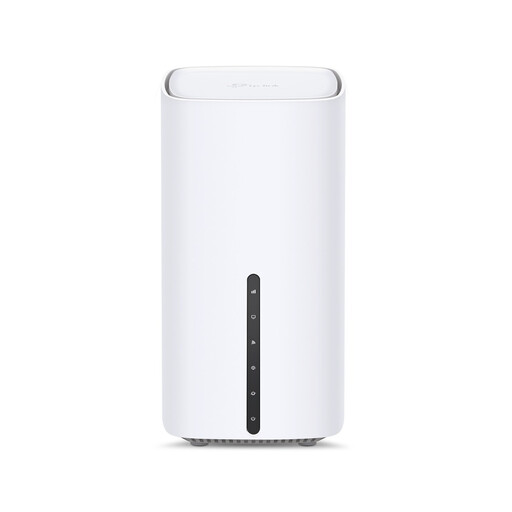
TP-Link Archer NX500 5G AX3000 dual-band Gigabit router
A home-router option for assessing 5G broadband instead of a slow copper connection. Confirm network-band and SIM compatibility with the intended provider, then check reception at the property, the plan’s data terms and any applicable trial conditions.
View on Joybuy
 No image available
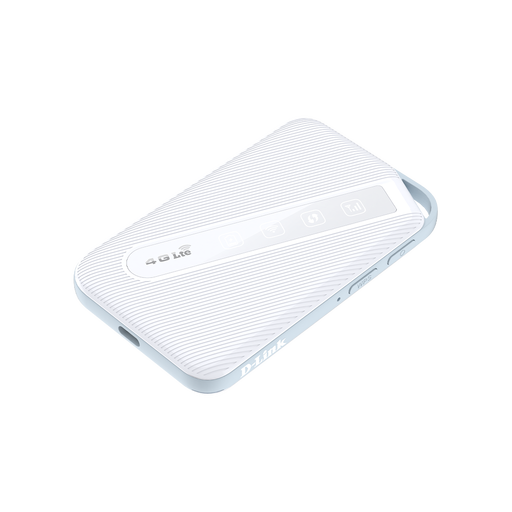
D-Link DWR-932W 4G LTE AX300 Wi-Fi 6 mobile hotspot
This portable hotspot is an option for sharing a 4G connection with devices, rather than a dedicated fixed-home router. Check its charging arrangement for home use, compatibility with the intended network and SIM, indoor reception and Ethernet support if you need a wired connection.
View on Joybuy
Common questions
Will an extender help if my laptop is slow beside the router?
Not if the incoming connection is the bottleneck. Ofcom notes that Wi-Fi can slow a speed test, so test with an Ethernet-connected device where possible before deciding whether the problem is Wi-Fi coverage or the broadband service.
What should I check before choosing 4G or 5G home broadband?
Check the intended network and provider at your exact address, then assess indoor reception, plan terms and the hub’s compatibility. Ofcom says in-home coverage predictions are only a guide; where the provider offers an appropriate trial or money-back period, use it to test the connection where and when you need it.
When is an outdoor mobile hub or antenna worth considering?
Consider one if the intended mobile service has usable reception outside but reception indoors is poor, and the exact equipment supports the proposed setup. Three provides installation guidance for its outdoor hub; an antenna or outdoor hub should not be assumed compatible with a different router.
What does a fixed wireless provider need to check?
The provider needs to confirm that it can serve the property and assess the installation. Airband says its fixed wireless service requires a clear path to a transmitter and may need an on-site survey; Voneus describes installations using an outside radio dish and an indoor router.
Is satellite broadband an option for a remote rural home?
It may be if the address is eligible and the equipment can be installed suitably. Starlink says residential availability varies by address, so confirm it before ordering and check its current equipment return terms if you intend to test the service.
