For everyday household use, start with a manufacturer-certified or retailer-refurbished laptop if controlling upfront spending matters and you can confirm its condition, warranty and return terms. Consider a private second-hand machine only when you can check the exact laptop, its software support, battery, charger and any account lock; a new budget model may be the more straightforward choice if those checks are impractical. For Windows laptops, Microsoft’s end of Windows 10 support makes a supported Windows 11 setup an important part of the comparison.
Who is this choice for?
Households watching upfront spending
If the replacement computer is mainly for browsing, email, documents, streaming and video calls, compare an exact refurbished configuration with a new budget laptop rather than comparing condition labels alone. Check that the software you need will remain supported.
Buyers who want a straightforward replacement
If you cannot spend time diagnosing a used machine, an identifiable seller, a clear condition description and written warranty and return terms deserve close attention. Confirm the charger and test the laptop promptly after it arrives.
People considering a used MacBook
If you want to continue using macOS, check the exact MacBook model and its battery condition. Apple Support warns that Activation Lock can prevent erasure, reactivation or use without the associated account credentials, so confirm its removal before completing a private purchase.
What matters when choosing?
For a household replacement, settle the software and seller questions alongside the laptop’s configuration: a familiar model name does not tell you its condition, installed system or terms of sale.
| Concern |
What to check |
Who this matters to |
| Everyday value |
Compare the exact memory, storage, screen and operating system of each candidate, as well as its stated condition. |
If I am replacing the household computer for browsing, documents and calls, I need a configuration that covers those tasks within my spending limit. About 31% of consumers put everyday value first. |
| Software support and account access |
For Windows, confirm Windows 11 is installed or check the exact machine’s eligibility with Microsoft’s PC Health Check. For a used Mac, confirm Activation Lock is removed. |
A laptop that switches on is little help if I cannot set it up or rely on its operating-system support. Continuing software support and account access come first for about 31% of consumers. |
| Seller and cover |
Identify whether the seller is a trader and read the listing’s condition description, warranty and return terms. |
When I need a replacement without a repair project, I want to know who is responsible if its condition differs from the listing. Clear seller accountability is the main concern for about 23% of consumers. |
| Battery and charger condition |
Ask for battery-health information where available; check that charging works and inspect the charger and socket for damage. |
If I will move the laptop around the home, worn battery capacity or questionable charging equipment could disrupt how I use it. About 15% of consumers prioritise physical condition and charging confidence. |
Buying pitfalls to avoid
-
Treating every refurbished grade as the same
Which? notes that refurbished stock and condition vary. A grade alone does not establish battery health, software support or which accessories come with a particular laptop.
Read that listing’s grade definition and specification, then check its battery information, charger, warranty and return terms before deciding.
-
Assuming an inexpensive Windows 10 laptop has a supported upgrade
Microsoft ended Windows 10 support on 14 October 2025. Being able to run an operating system is not, by itself, proof that the exact machine meets Windows 11 requirements.
Confirm Windows 11 is installed on a compatible machine, or use Microsoft’s PC Health Check to assess eligibility before purchase.
-
Assuming a used MacBook can simply be reset
Apple Support says Activation Lock can require the associated Apple Account credentials before a Mac can be erased, reactivated or used.
Have the seller demonstrate that the lock has been removed through a setup process you can check before completing the transaction.
Resolving a remaining lock can require help from the former owner, with no certain outcome.
-
Overlooking the supplied charger
Electrical Safety First warns against substandard or counterfeit laptop chargers. Damage to a plug, socket or charger is a reason to pause rather than treat it as cosmetic wear.
Confirm the charger is the original or a suitable replacement from the manufacturer or a reputable retailer, and inspect it before regular use.
Brands and programmes to consider
Apple
Apple’s UK Certified Refurbished programme is one route for households considering a MacBook; a MacBook bought from another seller needs its own condition and account-access checks.
- Apple states that its Certified Refurbished products receive full functional testing and a one-year warranty.
- For a used MacBook outside that programme, check Battery Health and confirm Activation Lock has been removed. The programme’s terms do not automatically apply to other sellers.
Dell
Dell Outlet offers a manufacturer-operated route for buyers comparing refurbished Windows laptops.
- Dell Outlet says its systems carry the same limited hardware warranty as if bought new.
- Check the exact outlet configuration and its Windows 11 status; an outlet warranty does not establish software compatibility for every model.
Lenovo
Lenovo’s certified refurbished programme is relevant when comparing manufacturer-backed Windows laptops, including ThinkPad-style models.
- Lenovo describes a technician-led refurbishment process and a one-year warranty for its certified refurbished devices.
- Confirm the individual listing’s configuration, condition and operating system rather than applying programme descriptions to every Lenovo laptop.
Laptop configurations on Joybuy
These household-use laptops provide configurations to compare with refurbished, private second-hand and new budget listings. Check each listing’s condition and seller terms before assigning it to a purchase route.
 No image available
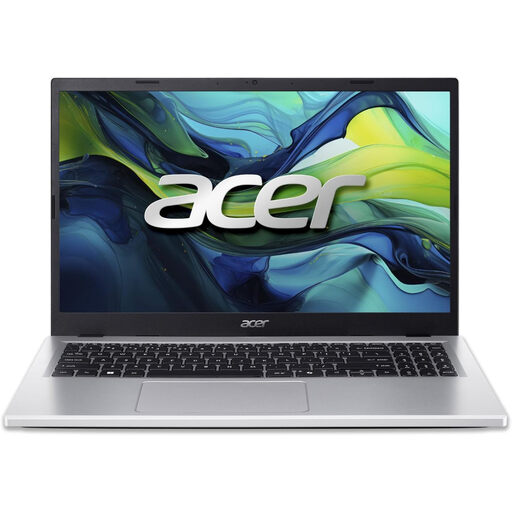
Acer Aspire Go 15 AG15-71P, Core i5-13420H
Compare this configuration if the household needs a Windows laptop for documents, browsing and calls. Its product name specifies 8GB DDR5 RAM, a 256GB NVMe SSD, a 15.6-inch Full HD screen and Windows 11 Home. Check the listed condition, battery information and seller terms.
View on Joybuy
 No image available
ASUS Vivobook 15 X1504VA, Core 5 120U
Consider this configuration when your file and application storage needs make capacity a priority. The product name specifies 24GB RAM, a 1TB SSD and a 15.6-inch screen. Confirm its installed operating system, condition, battery information and seller terms on the listing.
View on Joybuy
 No image available
Acer Aspire Lite AL15-36P-C29Z, Intel N150
Compare this model for basic household tasks if its storage will accommodate your files and applications. Its product name specifies 8GB DDR4 RAM, a 128GB SSD, a 15.6-inch Full HD screen and Windows 11 Home. Check whether S Mode applies to the configuration offered and whether it suits the apps you need; also confirm condition and battery information.
View on Joybuy
 No image available
Lenovo IdeaPad 1, Ryzen 3 7320U
Compare this configuration for browsing, email and documents, while checking whether its storage meets your needs. Its product name specifies 8GB RAM, a 128GB SSD, a 15-inch Full HD screen and Windows 11 Home in S Mode. Confirm that S Mode suits your required apps, then check condition, battery information and seller terms.
View on Joybuy
Common questions
Can I cancel an online refurbished-laptop order within 14 days?
For a UK distance purchase from a trader, GOV.UK and the Consumer Contracts Regulations describe a cancellation period ending 14 days after the day you receive the goods. Confirm whether the seller is a trader and keep the cancellation information supplied with the order; do not assume the same change-of-mind route applies to a private sale. Cancellation is distinct from remedies concerning faulty or misdescribed goods.
Should I buy a refurbished laptop running Windows 10?
Check for a supported software path before treating it as a household replacement. Microsoft says Windows 10 support ended on 14 October 2025; confirm Windows 11 is installed on a compatible machine or use Microsoft’s PC Health Check to assess the exact laptop’s eligibility. Do not assume that an installation alone proves compatibility.
How do I check a refurbished laptop’s battery?
Ask for condition information before purchase, then check the machine promptly when you receive it. Microsoft says PC Health Check can show battery-capacity information on qualifying older Windows devices; on a Mac, Apple’s Battery Health information can indicate whether service is recommended. Test charging and unplugged use within the applicable return period.
What should I check before buying a MacBook privately?
Confirm the exact model, battery condition and removal of Activation Lock before completing the sale. Apple Support says an active lock can require the associated Apple Account credentials to erase, reactivate or use the Mac; ask the seller to demonstrate a setup process you can verify.
Is the charger supplied with a second-hand laptop suitable to use?
Check its origin and condition before regular use. Electrical Safety First advises using the original charger or a replacement from the manufacturer or a reputable retailer, and checking the plug and socket for burn or scorch marks. Do not continue using damaged or unusually hot equipment.
