
Our Top Recommendations for a PS5 SSD in 2026: Expand Your Game Library
As a Joybuy Product Recommendation Officer, my role is to help you make informed purchasing decisions. This guide is based on objective product features and specifications.
The dreaded "Cannot download or copy" notification is a familiar sight for many PlayStation 5 owners. With blockbuster titles often demanding over 100GB of space, the console's built-in storage can fill up remarkably quickly. This leaves you facing the frustrating choice of which beloved game to delete to make room for the next big release.
Fortunately, there is a straightforward solution: a PS5 storage expansion. By installing a compatible M.2 solid-state drive (SSD), you can significantly increase your game library's capacity and get back to what matters—playing. This guide will walk you through the key considerations for choosing an internal SSD for your PS5 and provide our top recommendations for 2026 to help you upgrade with confidence.
A Practical Guide to Choosing an Internal SSD for Your PS5
Before making a purchase, it is important to understand the specific requirements for a PlayStation 5 SSD upgrade. Sony has set clear guidelines to ensure performance and stability.
1. A Heatsink is Essential
The PS5's M.2 expansion bay is a compact space, and high-speed SSDs generate considerable heat during operation. To prevent overheating and performance throttling, Sony requires that any installed M.2 SSD for PS5 must have a heatsink. This component dissipates heat, ensuring the drive maintains its speed during long gaming sessions. Some SSDs come with a pre-installed, integrated heatsink, which simplifies the installation process and guarantees a proper fit.
2. Speed and Capacity Requirements
Not just any SSD will do. Your chosen drive must have a PCIe Gen4 interface and a recommended sequential read speed of at least 5,500 MB/s. This ensures that games load just as fast, if not faster, than they do from the console's own storage. When it comes to capacity, consider your gaming habits. A PS5 SSD 1TB is a great starting point for most gamers, while a PS5 SSD 2TB offers a comfortable buffer for enthusiasts. For digital collectors, a PS5 SSD 4TB can virtually eliminate the need to manage storage at all.
3. The Value of an Officially Licensed Drive
While many third-party SSDs meet the technical specifications, choosing an officially licensed PS5 SSD provides an extra layer of assurance. These drives have been specifically tested and certified by Sony to work seamlessly with the PS5 console. This guarantees compatibility and performance, removing any guesswork from your PS5 storage expansion project.
Our Top Recommendations for PS5 SSDs in 2026
Based on performance, reliability and ease of installation, the WD_BLACK SN850P series stands out as a strong contender for PS5 owners. These drives are officially licensed and feature a heatsink designed specifically for the console.
WD_BLACK SN850P NVMe SSD for PS5 (1TB)
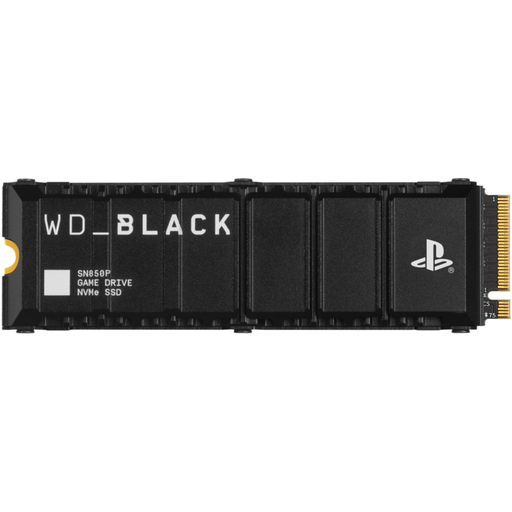
Why It Stands Out: This drive is an excellent entry point for expanding your PS5's capacity. As an officially licensed product, it offers guaranteed compatibility. The integrated heatsink is not only optimised for thermal performance within the PS5 but also features the PlayStation logo, confirming its purpose-built design.
Pros:
- Officially licensed for worry-free installation and performance.
- Heatsink is specifically designed for the PS5's M.2 slot.
- Adds 1TB of storage, with the brand stating it can hold up to 25 games.
- Enables you to play PS5 games directly from the drive.
Who is it for?: Gamers seeking a reliable and straightforward storage boost. If you want to keep a healthy rotation of your favourite games installed without constantly managing storage, this 1TB model is a practical choice.
WD_BLACK SN850P NVMe SSD for PS5 (2TB)
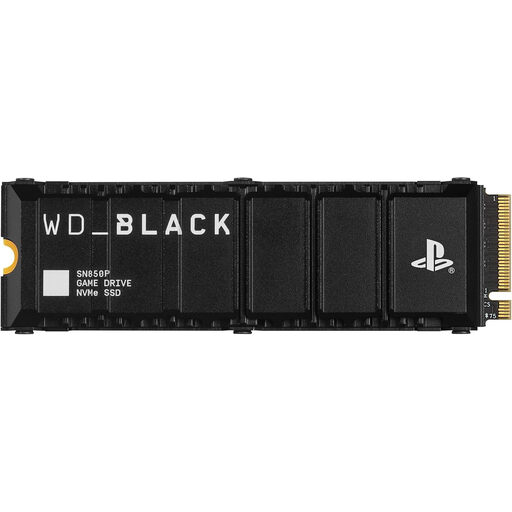
Why It Stands Out: The 2TB model hits a sweet spot for serious gamers, offering a substantial amount of space. It delivers the same high-speed performance and certified compatibility as its smaller sibling, with read speeds of up to 7,300 MB/s ensuring that loading screens remain minimal.
Pros:
- Massive 2TB capacity, which the brand suggests can store up to 50 games.
- Excellent balance of capacity and value for enthusiast players.
- Certified compatibility and a PS5-optimised heatsink.
- High-speed performance for fast game loading and seamless play.
Who is it for?: The dedicated gamer with a large digital library. If you frequently switch between multiple AAA titles and want to keep them all ready to launch, the PS5 SSD 2TB model is an ideal fit.
WD_BLACK SN850P NVMe SSD for PS5 (4TB)
Why It Stands Out: For the gamer who wants to set it and forget it, the 4TB model is the ultimate storage solution. This drive effectively quadruples the PS5's usable storage, providing enough space for a vast collection of games and future-proofing your console for years to come.
Pros:
- Enormous 4TB capacity, estimated by the brand to hold up to 100 games.
- Virtually eliminates the need for storage management.
- Maintains the same high-speed performance and officially licensed design.
- The definitive choice for building a comprehensive digital library.
Who is it for?: The hardcore digital collector and dedicated gamer who never wants to delete a game again. If you want maximum capacity and the convenience of having your entire library accessible at all times, this is the drive to consider.
Looking for Other Options?
The WD_BLACK SN850P line offers a reliable, officially licensed solution for your PS5. However, if you wish to compare other brands or explore different specifications that meet Sony's requirements, a wider selection is available.
Discover more options in our full NVMe solid state drive category.
Frequently Asked Questions about PS5 SSD Upgrades
Can I use any M.2 SSD for my PS5?
No, an M.2 SSD for PS5 must meet specific requirements outlined by Sony. Key criteria include a PCIe Gen4 interface, a minimum sequential read speed of 5,500 MB/s and a compatible heatsink for thermal management. Using a drive that does not meet these standards may lead to it not being recognised by the console or performing poorly.
Is it difficult to install an internal SSD for PS5?
The PlayStation 5 SSD upgrade is a user-friendly process. Sony provides official, easy-to-follow video and text guides. The installation typically involves removing one of the console's side panels, opening the expansion slot, inserting the drive and securing it. Most users can complete the process in under 15 minutes with just a Phillips-head screwdriver.
Will an external USB drive work the same as an internal PS5 SSD?
No, their functions differ significantly. You can store and play PS4 games from an external USB hard drive connected to your PS5. However, you can only store PS5 games on an external drive; you cannot play them from it. To play PS5 titles, they must be located on either the console's ultra-high-speed internal storage or a compatible internal PS5 SSD like the ones discussed here.