
Ease Wrist Pain: Your 2026 Guide to Choosing an Ergonomic Vertical Mouse
By Joybuy Product Recommendation Officer | Published on: 07 June 2026
That familiar ache in your wrist after a long day at the computer is a common complaint for many office professionals and remote workers. A standard mouse forces your forearm to twist into an unnatural, palm-down position, which can contribute to strain over time. An ergonomic vertical mouse is designed to address this very issue.
By holding your hand in a more neutral "handshake" position, these devices aim to reduce muscle tension in your arm and shoulder. This guide is designed to help you understand what to look for in a comfortable office mouse and to present a few carefully selected options that prioritise both function and long-term comfort.
What to Look for in an Ergonomic Vertical Mouse
Choosing the right mouse involves more than just its shape. To find a model that truly fits your workflow and physical needs, consider these key factors.
1. Connectivity: The Freedom of Wireless
A cluttered desk can be a distraction. A wireless ergonomic mouse removes the cable, offering a cleaner workspace and greater freedom of movement. Most wireless models connect in one of two ways:
- Bluetooth: A Bluetooth vertical mouse connects directly to your computer without needing a USB port for a receiver. This is ideal for laptops with limited ports or for users who switch between multiple devices.
- 2.4GHz Dongle: This connection uses a small USB receiver (dongle) that plugs into your computer. It often provides a very stable and responsive connection, which can be a priority for precision tasks. Many modern mice offer both options for maximum flexibility.
2. Grip Style and Hand Size
The core benefit of a natural handshake mouse is its posture. The vertical angle keeps your wrist and forearm from twisting. However, this is only effective if the mouse fits your hand properly. A mouse that is too large or too small can create new pressure points. Pay attention to the dimensions provided by the manufacturer and consider whether the design is suited for small, medium or large hands. This is a critical step in finding a solution for a mouse for carpal tunnel concerns or general wrist pain.
3. Essential Features for Productivity
Beyond the core ergonomic design, certain features can significantly enhance your daily workflow:
- Adjustable DPI: DPI, or Dots Per Inch, determines how sensitive the mouse cursor is to your physical movements. A mouse with adjustable DPI allows you to switch between lower settings for precise tasks like graphic design and higher settings for quickly navigating large screens.
- Programmable Buttons: Extra buttons, often placed for easy thumb access, can be programmed for custom shortcuts like 'copy', 'paste' or 'back'. This can save time and reduce repetitive keyboard actions.
- Battery Life: For wireless models, look for a long battery life to avoid frequent interruptions. Many modern mice use rechargeable batteries with quick-charge capabilities, while others use standard AA or AAA batteries that can last for months or even years.
Our Top Recommendations for 2026
We have analysed the market to identify models that offer a strong combination of ergonomic design, useful features and reliable performance.
HP 920 Ergonomic Wireless Mouse (Black)
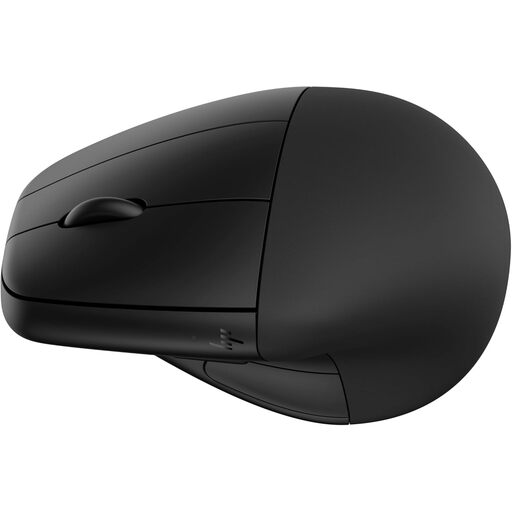
Why It Stands Out: The HP 920 is a comprehensive ergonomic solution that includes a detachable magnetic wrist rest for added support. It offers dual-mode connectivity (Bluetooth 5.3 and a 2.4GHz dongle) and a high-precision sensor with up to 4000 DPI. Its rechargeable battery is a standout feature, providing up to four months of use and fast-charging capabilities.
Pros:
- Includes a detachable wrist rest for customisable support.
- Long-lasting rechargeable battery with fast charging.
- Five programmable buttons for workflow optimisation.
- Made with 65% post-consumer recycled plastics.
Who is it for?: The power user who wants a full suite of features, including a wrist rest, extensive customisation and a long-lasting rechargeable battery for an uninterrupted workflow.
View the HP 920 Ergonomic Wireless Mouse
V7 MW500BT Bluetooth Vertical Ergonomic Mouse
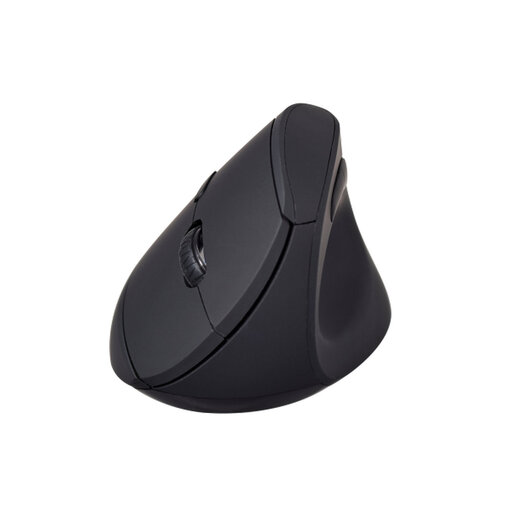
Why It Stands Out: The V7 MW500BT focuses on delivering the core benefits of a vertical mouse in a straightforward and effective package. It promotes the natural handshake grip with a concave thumb rest and soft-touch surface for comfort. With dual-mode wireless connectivity and three adjustable DPI settings (800, 1200, 1600), it provides the essential flexibility needed for daily office tasks.
Pros:
- Dual-mode wireless connection (Bluetooth and 2.4GHz).
- Soft-touch, non-slip surface for a secure grip.
- Six-button design including forward/back buttons.
- Runs on a single, readily available AA battery.
Who is it for?: The practical professional seeking a reliable and comfortable vertical mouse for wrist pain prevention without needing advanced customisation or a built-in rechargeable battery.
View the V7 MW500BT Vertical Ergonomic Mouse
Logitech Lift Vertical Ergonomic Mouse
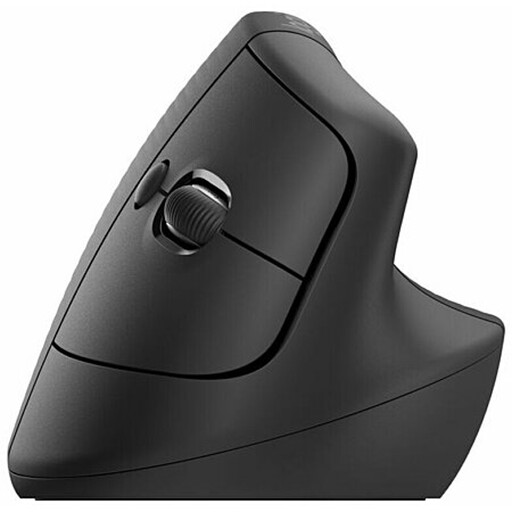
Why It Stands Out: The Logitech Lift is specifically engineered for users with small to medium-sized hands. Its 57-degree vertical angle is optimised to reduce wrist pressure. The mouse features whisper-quiet clicks, a smooth SmartWheel for precise scrolling and an impressive battery life of up to two years from a single AA battery. It connects via Bluetooth or the included Logi Bolt USB receiver.
Pros:
- Designed specifically for small to medium-sized hands.
- Optimal 57-degree angle for a natural handshake posture.
- Extremely long battery life (up to 24 months).
- Quiet clicks and an adaptive SmartWheel for scrolling.
Who is it for?: Individuals with smaller hands who have found other ergonomic mice too bulky, and anyone who values a quiet work environment and exceptionally long battery performance.
View the Logitech Lift Vertical Ergonomic Mouse
Looking for More Options?
These three models represent excellent choices for different needs, but the world of ergonomic peripherals is vast. If you are looking for different sizes, feature sets or price points, we invite you to explore our full range of wireless ergonomic mice to find the perfect fit for your desk.
Explore All Wireless Ergonomic Mice
Frequently Asked Questions
Can a vertical mouse really help with wrist pain?
A vertical mouse is designed to place your arm in a more neutral, untwisted posture, similar to a handshake. This can reduce the muscle strain and forearm pronation associated with using a traditional flat mouse. While many users report increased comfort and a reduction in discomfort, it is an ergonomic tool, not a medical device. It promotes a posture that may help alleviate strain from prolonged computer use.
How long does it take to get used to a vertical mouse?
There is typically an adjustment period. For the first few days, the grip can feel unusual, and your cursor control might seem less precise. Most users find they adapt fully within a week, after which the new posture feels natural and more comfortable than their old mouse.
Is a Bluetooth vertical mouse better than one with a dongle?
Neither is inherently "better," as it depends on your needs. Bluetooth offers a cable-free and dongle-free setup, which is great for portability and connecting to devices with few USB ports. A 2.4GHz dongle can sometimes provide a slightly more stable, lower-latency connection, which some users prefer for its reliability. Many mice, like the HP and V7 models above, offer both to give you the best of both worlds.