
Wireless Mechanical Keyboards: Top Picks for Cord-Free Typing
Tired of cable clutter on your desk? Searching for a typing experience that is both satisfying and responsive? A wireless mechanical keyboard might be the perfect upgrade for your setup. Whether you're a gamer seeking a competitive edge, a professional optimising your workspace or an enthusiast who appreciates a superior typing feel, navigating the options can be a challenge.
This guide is designed to cut through the jargon. As the Joybuy Product Recommendation Officer, my role is to provide clear, practical advice to help you find a keyboard that genuinely suits your needs, from its layout and connectivity to its feel and features.
How to Choose the Right Wireless Mechanical Keyboard for You
Before diving into specific models, let's cover a few key features to consider. Understanding these will help you make a more informed decision.
1. Find Your Perfect Size: Keyboard Layouts Explained
The physical size of your keyboard has a huge impact on ergonomics and desk space.
- 60% Keyboard: This ultra-compact layout removes the number pad, function row and arrow keys. It's a favourite among competitive gamers who need maximum space for wide mouse movements.
- 75% Keyboard: A popular middle ground, the 75% keyboard keeps the arrow keys and a condensed function row while remaining significantly smaller than a full-size board. It offers a great balance of functionality and a compact footprint.
- 96% and Compact Full-Size: These layouts cleverly squeeze a number pad into a smaller frame, offering nearly full-size functionality while saving valuable desk real estate. They are ideal for those in data entry or programming who can't live without a numpad.
2. Master Your Connections: Tri-Mode and Bluetooth
Wireless freedom doesn't mean sacrificing performance. A tri-mode mechanical keyboard offers the ultimate versatility:
- 2.4GHz Wireless: This connection uses a dedicated USB dongle to provide an ultra-low latency signal, making it ideal for fast-paced gaming where every millisecond counts.
- Bluetooth: A bluetooth mechanical keyboard allows you to connect to multiple devices—like a laptop, tablet and phone—and switch between them seamlessly. It's perfect for multitasking and hybrid work environments.
- Wired (USB-C): A reliable wired connection is essential for charging and offers a foolproof option for competitive play or when you simply want a direct link.
3. The Feel and Sound: Switches and Customisation
The heart of any mechanical keyboard is its switches. While there are many variations, they generally fall into three categories: Clicky (audible and tactile), Tactile (a noticeable bump without the click) and Linear (smooth and quiet). For those who like to experiment, a hot-swappable keyboard is a fantastic feature. It allows you to pull out the existing switches and plug in new ones without any soldering, giving you complete control over your typing experience.
Top Wireless Mechanical Keyboard Recommendations
Here are a few standout models that cater to different needs and preferences, selected for their features, performance and value.
ET 60% Tri-Mode Mechanical Keyboard
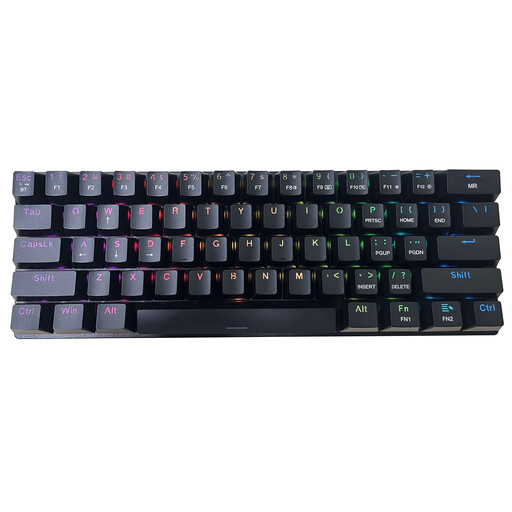
Why It Stands Out: This keyboard is all about maximising desk space and portability. As a 60% keyboard, its minimalist design is perfect for focused gaming setups or for slipping into a backpack. The inclusion of tri-mode connectivity makes it a versatile companion for a PC, laptop or tablet.
-
Pros:
- Ultra-Compact: The 61-key layout frees up a significant amount of desk space for your mouse.
- Versatile Connectivity: Switch between 2.4GHz, Bluetooth and wired USB-C connections.
- Classic Typing Feel: Comes with Clicky Blue switches that provide satisfying audible and tactile feedback.
- Vibrant Lighting: A fully customisable RGB keyboard with 16 modes to personalise your setup.
-
Who is it for? Gamers looking for a compact gaming keyboard to maximise mouse movement, as well as students and travellers who need a portable and reliable keyboard for various devices.
AULA F99 Mechanical Wireless Keyboard
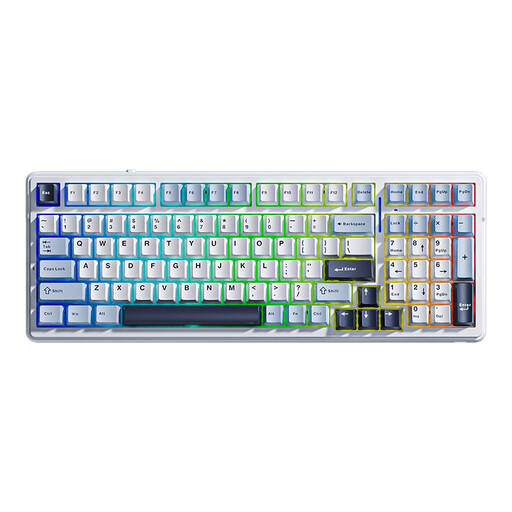
Why It Stands Out: The AULA F99 strikes an excellent balance between compact design and full functionality. Its 99-key layout retains the number pad, making it a powerhouse for productivity. Internally, its five-layer sound-dampening structure and pre-installed LEOBOG Greywood V3 switches deliver a remarkably smooth and quiet typing experience. The massive 8000mAh battery also provides exceptional endurance for long wireless sessions.
-
Pros:
- Space-Saving Numpad: The 96% layout keeps the number pad without the bulk of a traditional full-size keyboard.
- Exceptional Battery Life: An 8000mAh battery ensures extended use between charges.
- Refined Typing Sound: Multi-layer foam and gaskets reduce hollow noise for a more solid, pleasing sound.
- Fully Customisable: A hot-swappable keyboard PCB supports both 3-pin and 5-pin switches for easy modification.
-
Who is it for? Professionals, programmers and anyone who relies on a number pad but wants a cleaner, more modern desk setup. It's also a great starting point for enthusiasts who want a well-built, customisable base.
Ajazz AK820 Pro 75% Mechanical Tri-Mode Keyboard
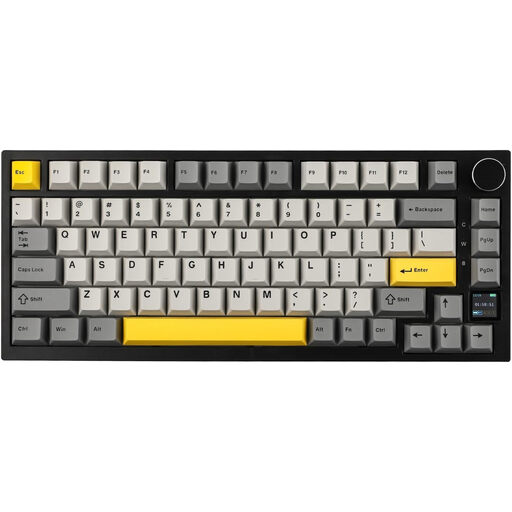
Why It Stands Out: The Ajazz AK820 Pro brings a high-end feature to the forefront: an interactive TFT colour screen. This small display is surprisingly practical, showing battery life, connection mode and time at a glance. It even supports custom GIFs. Beyond the screen, its gasket-mounted structure provides a cushioned, flexible typing feel that reduces fatigue, making it a joy to use for long periods.
-
Pros:
- Interactive TFT Screen: Provides real-time status updates and customisation options.
- Premium Typing Feel: The gasket-mount design and multi-layer foam create a soft, deep and satisfying typing sound.
- Convenient Controls: Features a metallic rotary knob for quick volume and media adjustments.
- Cross-Platform Ready: A great keyboard for Mac and PC, with easy layout switching via the screen.
-
Who is it for? Tech enthusiasts, creative professionals and gamers who appreciate innovative features and a premium, cushioned typing experience. The 75% keyboard layout is perfect for those who want a compact board without sacrificing arrow and function keys.
Looking for Something Different?
Our recommendations cover a range of popular needs, but the world of mechanical keyboards is vast. If you're looking for different layouts, switch types or a particularly light keyboard, we invite you to explore our broader collection to find your perfect match.
Frequently Asked Questions
Is a wireless mechanical keyboard good for gaming?
Yes, particularly models that feature a low-latency 2.4GHz wireless connection. This mode offers response times that are virtually indistinguishable from wired keyboards, making them perfectly suitable for even high-level competitive gaming. A compact gaming keyboard layout can also provide a significant ergonomic advantage by creating more space for mouse movement.
How long does the battery last on a bluetooth mechanical keyboard?
Battery life can vary widely depending on the model's battery capacity and your usage habits. The biggest factor is the RGB keyboard backlighting; with lights on, a keyboard might last for 10-40 hours of continuous use. With the lights off, that same keyboard could last for weeks or even months. Always check the manufacturer's specifications for an estimate.
Can I use a wireless mechanical keyboard with a Mac and a PC?
Absolutely. Most modern wireless keyboards are designed with multi-system compatibility in mind. Look for models that explicitly state support for both Windows and macOS. Many, like the Ajazz AK820 Pro, include convenient shortcuts or on-screen functions to instantly switch the key layout to match your current operating system, ensuring a seamless experience on any device.