
Finding the Right Wired Mouse in 2026: Our Top Picks for Work and Home
In a world of wireless gadgets, the humble wired mouse remains a steadfast choice for many. If you've ever been frustrated by a lagging cursor, a dead battery in the middle of an important task or confusing Bluetooth pairing, you already understand the appeal. A wired mouse offers a simple promise: a stable, responsive connection that works every time you plug it in.
As a Joybuy Product Recommendation Officer, my role is to help you find practical products that deliver on their promises. This guide is designed to cut through the clutter and highlight reliable options for your office, study or home setup. We will explore what makes a good corded mouse and present a few recommendations that balance performance, comfort and value.
A Quick Guide to Choosing a Wired Mouse
Selecting a new PC mouse doesn't need to be complicated. Focusing on a few key features will ensure you get a device that serves you well for years to come.
1. Sensor and Responsiveness
Most modern mice use optical technology. An optical mouse works by tracking movement with a light sensor, offering smooth and accurate performance on most surfaces. For general use, such as in an office mouse or a basic computer mouse, a sensitivity of around 1000 DPI (Dots Per Inch) is more than enough for precise cursor control without feeling overly sensitive.
2. Design and Comfort
You will be holding your mouse for hours, so comfort is key. Many models feature an ambidextrous design, making them suitable for both left- and right-handed users. For those who use a mouse intensively, an ergonomically sculpted mouse designed for a specific hand can provide better support and reduce strain over long periods.
3. Connection and Setup
The primary advantage of a corded mouse is its simplicity. Look for a plug and play mouse with a standard USB connection. This ensures you can plug it into nearly any computer—be it a PC, Mac or laptop—and have it work instantly, with no drivers or software to install. The direct USB mouse connection also guarantees a lag-free experience, which is essential for productivity.
Our Top Recommendations for 2026
After reviewing a range of options available on the market, we have selected three wired mice that stand out for their reliability and practical features.
Logitech B100 Wired USB Mouse
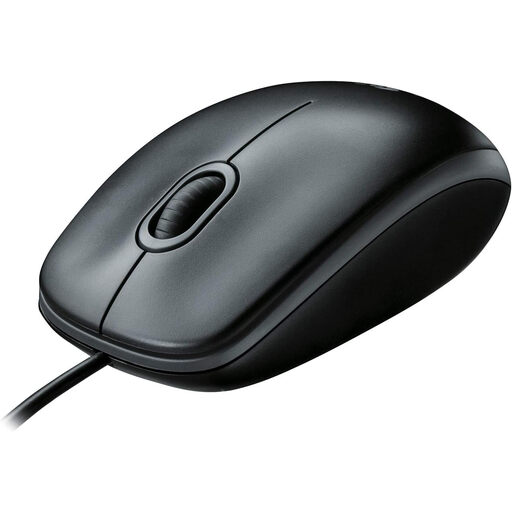
Why It Stands Out: The Logitech B100 is the definition of a straightforward, dependable tool. It forgoes complex features in favour of pure function, delivering consistent performance for all everyday computing tasks. Its simple, durable design makes it a workhorse.
Pros:
- Plug-and-Play Simplicity: Works straight out of the box with its USB connection.
- Ambidextrous Design: Comfortably fits both left and right hands.
- Smooth Optical Tracking: Provides responsive cursor control for effortless navigation.
- Durable Build: Built to withstand the demands of daily use in an office or home.
Who is it for? This mouse is an excellent choice for students, home users and businesses seeking a large quantity of reliable, low-maintenance peripherals. If you need a basic computer mouse that simply works without any fuss, the B100 is a solid contender.
View the Logitech B100 Wired USB Mouse
DELL Mouse MS116 Optical Wired Black
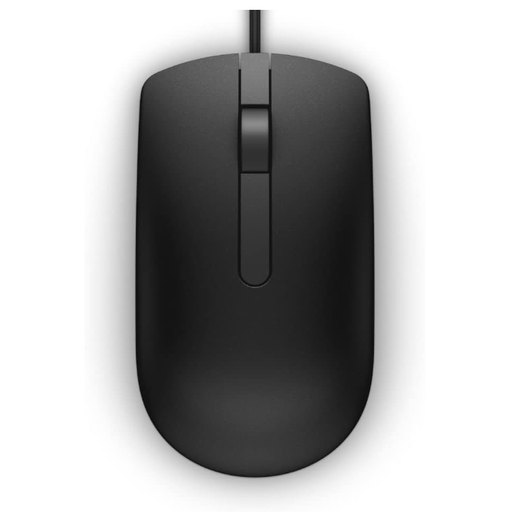
Why It Stands Out: The Dell MS116 combines a professional, minimalist aesthetic with reliable functionality. Its 1000 DPI optical sensor ensures accurate tracking, making it a great companion for detail-oriented work and general navigation in a professional setting.
Pros:
- Accurate Tracking: The 1000 DPI optical sensor delivers smooth and precise cursor movement.
- Ergonomic Shape: The ambidextrous design provides a comfortable grip for extended use.
- Professional Look: Its sleek matte black finish fits well in any office environment.
- Reliable Wired Connection: Offers consistent performance without battery or connectivity concerns.
Who is it for? Office professionals and IT managers will appreciate the MS116's blend of performance, durability and professional appearance. It is an ideal office mouse for outfitting workstations where consistency and reliability are paramount.
View the DELL Mouse MS116 Optical Wired Black
Logitech Mouse M500s Advanced Corded Black
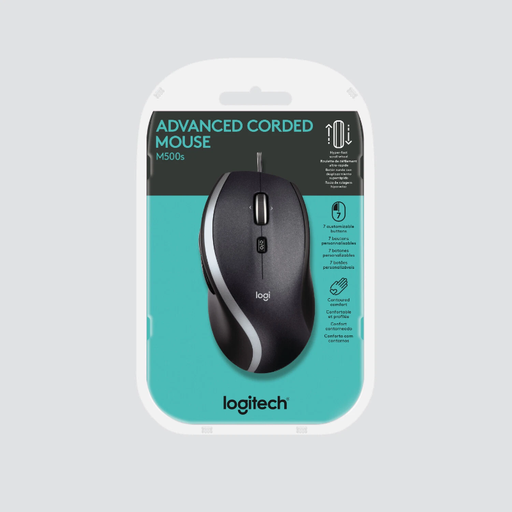
Why It Stands Out: For those who need more than the basics, the Logitech M500s offers advanced features designed to boost productivity. Its standout feature is the ultra-fast scroll wheel, which allows you to fly through long documents and web pages. Combined with programmable buttons and an ergonomic shape, it is a true power-user tool.
Pros:
- Hyper-Fast Scrolling: Effortlessly navigate long spreadsheets and documents.
- High-Precision Optical Sensor: Delivers superior accuracy for detailed tasks.
- Ergonomic Design: The sculpted, right-handed shape provides excellent comfort and support.
- Customisable Buttons: Programmable buttons allow you to create shortcuts for your workflow.
Who is it for? This mouse is tailored for power users, such as programmers, designers and analysts, who spend their day navigating complex software and large files. If your work involves more than just basic pointing and clicking, the M500s offers features that can genuinely speed up your tasks.
View the Logitech Mouse M500s Advanced Corded Black
Looking for More Options?
While these three models cover a wide range of needs, they are just a starting point. If you are looking for a different shape, feature set or price point, we invite you to browse our complete collection.
Explore Our Full Range of Wired Mouse Options
Frequently Asked Questions
Are wired mice better than wireless?
It depends on your priorities. A wired mouse provides a stable, lag-free connection and never requires batteries, making it exceptionally reliable for focused work. A wireless mouse offers greater freedom of movement but can be susceptible to interference and requires charging or battery replacement. For uninterrupted performance, a corded model is often the preferred choice.
Do I need to install software for a USB mouse?
Most modern wired mice are plug and play. This means you can connect the USB mouse to your computer and the operating system will automatically recognise it and have it ready for use in seconds. No additional drivers or software are typically required for standard functionality.
What is an optical mouse?
An optical mouse uses an LED light and a small sensor to track its movement across a surface. This technology has become the standard for computer mice because it provides accurate and responsive cursor control on most common desk surfaces without the need for a mouse pad. All the recommendations in this guide are optical mice.