
Our Top Recommendations for the Best Wi-Fi Extender in the UK for 2026
Is there anything more frustrating than a video call dropping mid-sentence or your favourite show buffering at a crucial moment? We’ve all been there: huddled in one corner of the house just to get a stable connection, while other rooms remain stubborn Wi-Fi dead zones. A weak signal from your router can disrupt work, entertainment and keeping in touch.
The good news is that you don’t have to put up with it. This guide is designed to help you understand the different ways you can improve your home Wi-Fi. We will walk you through the main types of solutions—from simple range extenders to comprehensive mesh systems—and provide some practical advice to help you find a suitable option for your home, without the marketing jargon.
How to Choose the Right Wi-Fi Signal Booster for Your Home
Before you decide, it’s helpful to understand what you’re looking for. Here are a few key points to consider when trying to improve your Wi-Fi signal.
1. Understand the Different Types of Solutions
The term 'Wi-Fi extender' is often used as a catch-all, but there are three main types of devices, each suited to different situations.
- Wi-Fi Range Extender: This is the most common type of wifi signal booster. It works by capturing the existing wireless signal from your router and rebroadcasting it, extending its reach to cover a specific dead spot. They are typically simple, plug-in devices.
- Powerline Adapter with Wi-Fi: This clever solution uses your home’s existing electrical wiring to carry the internet signal. One adapter plugs in near your router and connects to it via an Ethernet cable. The other adapter plugs into any socket in the house, creating a new, strong Wi-Fi hotspot. This is particularly effective in homes with thick, signal-blocking walls.
- Whole Home Mesh Wi-Fi: For a complete and seamless solution, a whole home mesh Wi-Fi system is the modern standard. It consists of multiple units (nodes) placed around your home that work together to create a single, unified network. As you move from room to room, your device automatically connects to the strongest node without any interruption. This is an excellent way to eliminate Wi-Fi dead zones across a large property.
2. Consider Your Home's Size and Layout
The right choice heavily depends on your living space. For a small flat with one problematic room, a simple wifi range extender is often sufficient. However, for a multi-storey property or a wifi for large house with solid internal walls, a powerline adapter with wifi or a mesh system will provide far more reliable and consistent coverage.
3. Check Wi-Fi Standards and Speeds
Look for devices that support modern Wi-Fi standards. Wi-Fi 5 (802.11ac) is still very capable, but Wi-Fi 6 (802.11ax) is the newer standard, offering faster speeds, greater capacity and better performance in homes with many connected devices (like smartphones, laptops, smart TVs and security cameras). Most modern solutions are also dual-band, offering both a 2.4 GHz band (for better range) and a 5 GHz band (for faster speeds).
Our Top Recommendations for Wi-Fi Extenders in 2026
Here are our recommendations for different needs and home types, based on their features and intended use.
For Simple, Targeted Dead Zones: TP-Link WA850RE 300Mbps Wi-Fi Range Extender
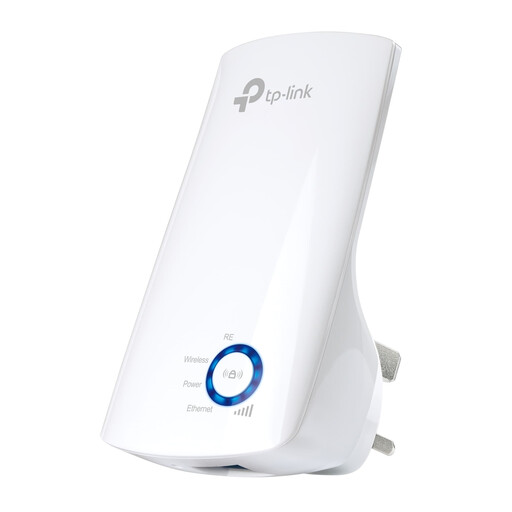
Why It Stands Out The TP-Link WA850RE is a straightforward and effective solution for a common problem. Its main appeal is its simplicity. You just plug it into a wall socket, press a couple of buttons to connect it to your router and it starts boosting your signal. Its compact, wall-mounted design means it stays out of the way, and the built-in Ethernet port is a useful bonus for connecting a device that requires a wired connection, like a PC or games console.
Pros
- Very simple plug-and-play setup.
- Compact and unobtrusive design.
- Single Ethernet port for a stable wired connection.
- An accessible entry point for improving Wi-Fi coverage.
Who is it for? This is ideal for individuals in smaller homes, flats or student accommodation who need to extend their Wi-Fi signal to a specific room, such as a home office or bedroom, that suffers from poor reception.
For Homes with Thick Walls: TP-Link TL-WPA8631P KIT AV1300 Powerline Wi-Fi Extender Kit
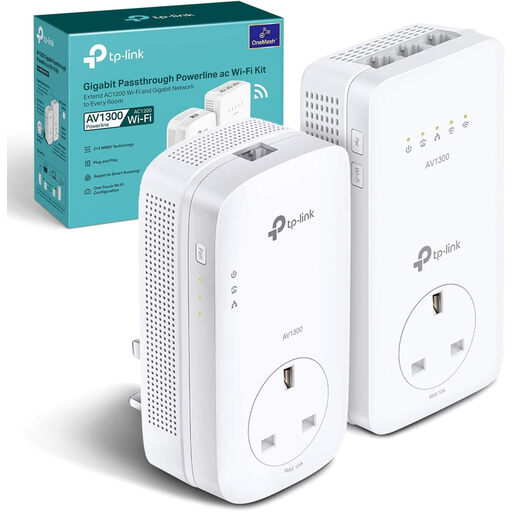
Why It Stands Out This powerline kit offers a robust way to bypass the physical obstacles that block Wi-Fi signals. By sending the data through your home's electrical circuit, it delivers a strong connection to rooms that a standard extender can't reach. A key feature is the integrated power socket, which ensures you don't lose a valuable plug outlet. With three Gigabit Ethernet ports and dual-band Wi-Fi, it provides both fast wired and wireless connectivity where you need it most.
Pros
- Effectively bypasses thick walls and multiple floors.
- Provides fast, stable connections for both wired and wireless devices.
- The pass-through socket means you don't sacrifice an outlet.
- Compatible with OneMesh routers for creating a unified network.
Who is it for? This is a great choice for people in older houses with solid brick walls or multi-storey homes where the Wi-Fi signal struggles to travel between floors. It's also perfect for gamers or remote workers who need a reliable wired connection far from the main router.
For Complete and Seamless Coverage: TP-LINK AX1500 Whole Home Mesh Wi-Fi 6 System (3-Pack)
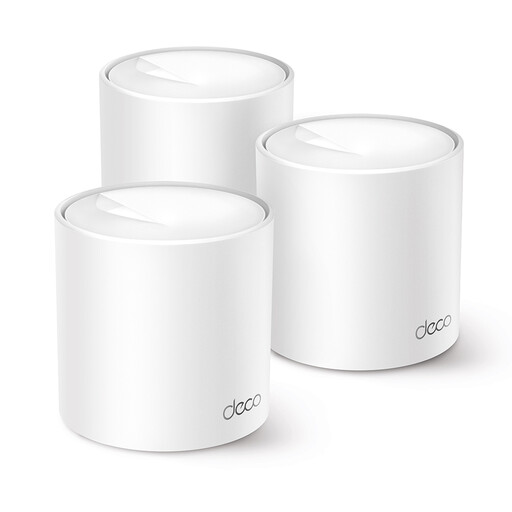
Why It Stands Out The TP-Link Deco X1500 system is a comprehensive upgrade for your entire home network. Instead of just extending a signal, it replaces it with a powerful, intelligent mesh network. The three units work together to provide seamless coverage under a single network name, so you can walk anywhere in your home without your connection dropping. It uses the latest Wi-Fi 6 technology, designed to handle dozens of connected devices simultaneously without slowing down, making it perfect for the modern smart home.
Pros
- Eliminates dead zones across a large area with one seamless network.
- Wi-Fi 6 technology provides faster speeds and greater capacity for more devices.
- Simple, guided setup and network management via the Deco smartphone app.
- Includes parental controls and security features through TP-Link HomeShield.
Who is it for? This system is designed for those living in a wifi for large house or anyone who wants to completely overhaul their network for the best possible performance. It's an excellent investment for families with multiple users, gamers, 4K streamers and homes filled with smart gadgets.
Looking for More Options?
The world of home networking is vast. If these specific models don't quite match your needs or you're curious about other solutions, we have a wider selection available. Explore our full range of network routers and accessories to find the perfect fit for your home.
Frequently Asked Questions
1. What's the difference between a Wi-Fi extender and a Wi-Fi booster? The terms wifi range extender and wifi signal booster are often used interchangeably in marketing. Both refer to a device that takes your existing Wi-Fi signal and rebroadcasts it to increase its coverage area. They perform the same essential function.
2. Where is the best place to put a Wi-Fi extender? For optimal performance, place the extender roughly halfway between your router and the area with a weak signal. It needs to be within a good reception range of the router to receive a strong signal that it can then effectively rebroadcast. Avoid placing it behind furniture, in cupboards or near large metal objects that can obstruct the signal.
3. Will a Wi-Fi extender slow down my internet speed? A basic, single-band range extender can reduce your available bandwidth, as it uses the same radio to both receive and transmit the signal. However, modern dual-band extenders, powerline adapters and mesh systems are designed to minimise this impact. They use different bands or methods (like electrical wiring) to maintain higher speeds throughout your home.