
Choosing Your Next Gaming Mouse: Our Top Recommendations for 2026
Navigating the world of PC gaming peripherals can feel like a quest in itself. With so many specifications, shapes and technologies on the market, finding the right gaming mouse that fits your playstyle and budget can be a challenge. Whether you're a competitive esports player demanding pixel-perfect precision or a casual gamer looking for a reliable and comfortable device, the core requirements are the same: responsiveness, accuracy and comfort.
As a Joybuy Product Recommendation Officer, my role is to help you cut through the clutter. This guide focuses on the practical features that matter, helping you understand what to look for and presenting a couple of standout options for your consideration in 2026.
Your Guide to Selecting a PC Gaming Mouse
Before diving into specific models, let's break down a few key considerations. Understanding these will empower you to make a more informed choice that aligns with your personal needs.
Connectivity: Wired vs. Wireless Gaming Mouse
The debate between a wired gaming mouse and a wireless gaming mouse is a long-standing one, but modern technology has largely closed the performance gap.
- Wired: A wired connection offers a zero-latency, interference-free signal, which is why many competitive players have traditionally favoured it. It also means you never have to worry about battery life. The main drawback is the cable, which can create drag or clutter on your desk.
- Wireless: Modern 2.4GHz wireless technology now provides latency that is virtually indistinguishable from wired counterparts. The freedom of movement is a significant advantage, creating a cleaner setup. The primary consideration is battery life, though many current models offer hundreds of hours of use per charge.
Feel and Form: The Importance of Weight and Ergonomics
How a mouse feels in your hand is just as important as its internal technology.
- Weight: A lightweight gaming mouse (typically under 80g) can reduce wrist fatigue during long sessions and allow for faster, more agile movements. This is often preferred by players who use a low DPI setting and make large, sweeping motions.
- Ergonomics: An ergonomic gaming mouse is shaped to fit the natural contour of your hand, providing support and comfort. Your grip style—be it palm, claw or fingertip—will heavily influence which shape feels best for you.
Performance Decoded: DPI, Polling Rates and Programmable Buttons
These technical terms directly impact how the mouse performs in-game.
- DPI (Dots Per Inch): This measures the mouse's sensitivity. A higher DPI means the cursor moves further on screen for a smaller physical movement of the mouse. Most gaming mice offer adjustable DPI, allowing you to switch between settings for different scenarios (e.g., high DPI for fast turns, low DPI for precise aiming).
- Polling Rate: Measured in Hertz (Hz), this is how often the mouse reports its position to the computer. A standard gaming mouse has a 1000Hz polling rate (1ms response time). Newer models are pushing this further, with the introduction of the 8K polling rate mouse (8000Hz), which reports its position 8,000 times per second for exceptionally smooth and responsive tracking.
- Programmable Buttons: A programmable gaming mouse allows you to assign custom commands, macros or key-binds to its extra buttons, giving you a competitive edge by keeping critical actions at your fingertips.
Our Top Recommendations for 2026
Based on a balance of features, performance and value, here are two distinct options that cater to different types of gamers.
MSI CLUTCH GM08 - Wired Optical Gaming Mouse
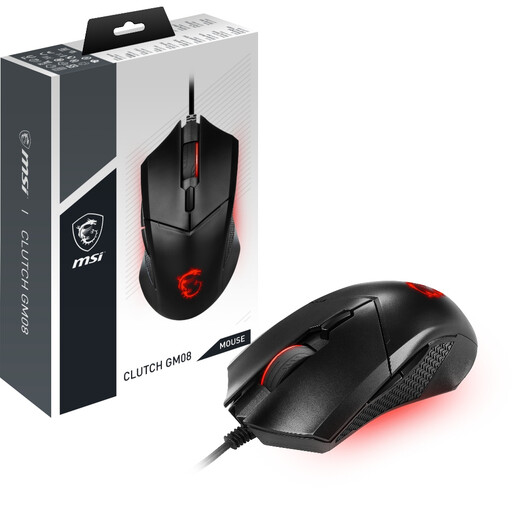
Why It Stands Out: The MSI CLUTCH GM08 is a testament to the fact that an affordable gaming mouse does not have to mean a compromise on core performance. It focuses on delivering the essentials with precision and durability. The wired connection ensures a consistent, lag-free experience, making it a highly reliable tool for any game.
Its PixArt PAW-3519 optical sensor provides accurate tracking, and the on-the-fly DPI switch allows for quick sensitivity adjustments in the heat of battle. The build quality is solid, with main switches rated for over 10 million clicks, offering peace of mind for long-term use.
Pros:
- Reliable Wired Performance: A 1000Hz polling rate and gold-plated USB connector provide a stable, zero-latency connection.
- Durable Construction: Switches are rated for 10+ million clicks, ensuring longevity.
- Adjustable DPI: Easily switch between five preset DPI levels up to 3200 (4200 via software).
- Excellent Value: Delivers core gaming features at an accessible price point.
Who is it for? This mouse is an excellent choice for gamers entering the world of PC gaming, those on a strict budget or anyone who values the straightforward reliability of a wired connection without needing a host of extra features.
RAPOO VT3 MAX Wireless Gaming Mouse
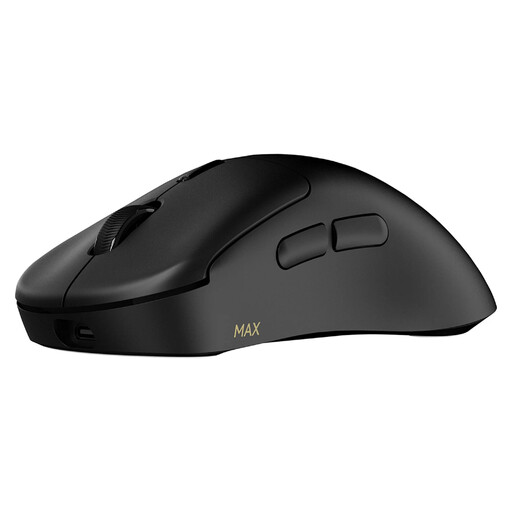
Why It Stands Out: The RAPOO VT3 MAX represents the cutting edge of wireless gaming technology. It combines an incredibly lightweight design at just 53g with a suite of high-performance features. The standout specification is its native True 8K wireless polling rate, delivering exceptionally smooth and responsive cursor movement that can provide a tangible advantage in fast-paced competitive games.
Furthermore, its power efficiency is remarkable. According to Rapoo, the Nordic nRF54L15 MCU enables a battery life of up to 750 hours at a 1000Hz polling rate, effectively removing battery anxiety from the equation for most users.
Pros:
- Ultra-Lightweight Design: At only 53g, it allows for swift movements with minimal wrist strain.
- High-Performance Wireless: Features a native 8000Hz wireless polling rate for ultra-smooth tracking.
- Extended Battery Life: Offers up to 750 hours of use on a single charge in its low-power mode.
- Highly Customisable: Comes with 10 programmable buttons and a 30K DPI sensor with independent X/Y-axis adjustment.
Who is it for? This mouse is geared towards competitive gamers, tech enthusiasts and anyone seeking top-tier wireless performance in a feather-light package. If you prioritise a clean, wire-free desk setup without sacrificing an ounce of responsiveness, the VT3 MAX is a compelling option.
Looking for More Options?
These two recommendations cover distinct needs, but the world of gaming mice is vast. If neither of these is the perfect fit for you, or if you'd simply like to browse a wider range of styles and feature sets, you can explore more choices in our broader category.
️ Explore our full range of Optical Mouse products here
Frequently Asked Questions About Gaming Mice
What is a good DPI for a gaming mouse?
There is no single "best" DPI; it's a matter of personal preference. Many professional FPS players use a lower DPI (between 400-1600) for more precise control, requiring larger arm movements. Players of MOBAs or strategy games might prefer a higher DPI for faster screen navigation. The key is to find a setting that feels comfortable and consistent for you.
Is a lightweight gaming mouse better?
A lightweight mouse can be beneficial for reducing fatigue and enabling faster flicks, especially in games that require quick reactions. However, some players prefer the heft and stability of a heavier mouse for more deliberate, controlled movements. It ultimately comes down to your personal comfort and playstyle.
Are wireless gaming mice as good as wired ones for gaming?
Yes. Modern 2.4GHz wireless technologies have advanced to the point where their latency and stability are on par with their wired counterparts. For the vast majority of players, including professionals, there is no discernible performance difference. The choice now primarily revolves around the convenience of being wire-free versus the simplicity of never needing to charge.