
Finding Your Edge: A Guide to the Top 240Hz Gaming Monitors of 2026
In the world of competitive gaming, every millisecond counts. A slight stutter or a moment of motion blur can be the difference between victory and defeat. If you're looking to gain a tangible advantage in fast-paced titles, upgrading to a 240Hz gaming monitor is one of the most significant improvements you can make to your setup. This guide is designed to help you understand the key features to look for and to present our top recommendations for 2026, helping you find the perfect display for your needs.
What to Look for in a High-Performance Gaming Monitor
Navigating the technical specifications of gaming monitors can be confusing. Here are a few key factors to focus on when making your decision.
1. The Synergy of Refresh Rate and Response Time
A high refresh rate is only part of the equation. A 240Hz gaming monitor updates the image on screen 240 times per second, providing incredibly fluid motion. However, this must be paired with a low response time to prevent ghosting or smearing. Look for a 1ms response time monitor (or lower) to ensure that each of those 240 frames is rendered with maximum clarity. This combination is what gives you the sharp, responsive visuals needed for an esports monitor.
2. Panel Technology: Speed, Colour and Angles
The type of panel used in a monitor significantly impacts its performance. While older TN panels were once the fastest, modern IPS gaming monitor technology now offers the best of both worlds. IPS (In-Plane Switching) panels provide excellent colour accuracy and wide viewing angles without compromising on speed, making them a superb choice for gamers who also use their monitor for content creation or media consumption.
3. Adaptive Sync for Tear-Free Gaming
Screen tearing occurs when your monitor's refresh rate is out of sync with the frame rate from your graphics card. Adaptive Sync technology solves this. Whether it's AMD FreeSync or a G-Sync compatible monitor, this feature synchronises the two, eliminating tearing and stuttering for a perfectly smooth experience. It's a must-have feature for any serious monitor for competitive gaming.
Our Top Recommendations for High-Refresh-Rate Gaming in 2026
Here are our recommendations, selected to meet the needs of different types of gamers, from competitive enthusiasts to those seeking a versatile all-rounder.
ASUS TUF VG279QM5A: The Competitive All-Rounder
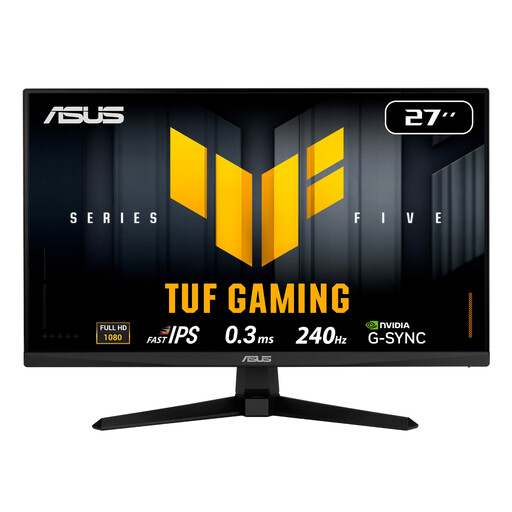
Why It Stands Out: The ASUS TUF VG279QM5A hits the sweet spot for most competitive gamers. It combines a 27 inch gaming monitor screen with a native FHD 240Hz monitor refresh rate. Its ASUS Fast IPS panel delivers an exceptionally low 0.3ms response time, ensuring motion is rendered with outstanding clarity. The inclusion of ELMB SYNC (Extreme Low Motion Blur Sync) allows you to use motion blur reduction and adaptive sync simultaneously, a feature that provides a clear competitive edge.
Pros:
- True 240Hz refresh rate for ultra-smooth gameplay.
- Fast IPS panel with a 0.3ms response time for minimal ghosting.
- Supports both AMD FreeSync Premium and is G-Sync Compatible.
- Excellent console support, making it a great monitor for PS5 120Hz gaming via its HDMI 2.1 ports.
Who is it for? This monitor is ideal for the serious PC gamer who plays fast-paced FPS and battle royale games and wants a clear competitive advantage. It's also a fantastic choice for console gamers on PS5 or Xbox Series X looking to maximise their 120Hz performance modes.
Thunderobot CF25F300L: The Esports Professional's Choice
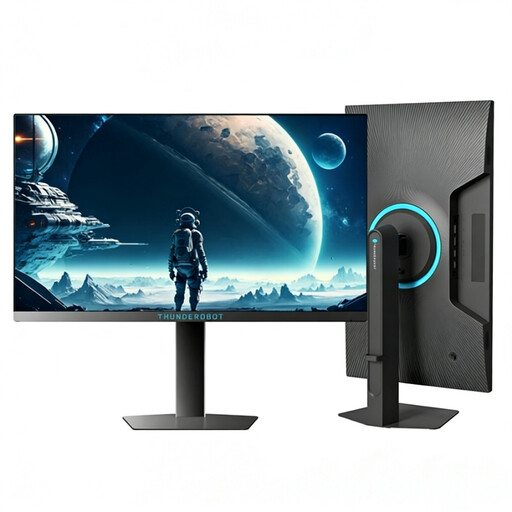
Why It Stands Out: For those who demand the absolute highest level of performance, the Thunderobot CF25F300L pushes beyond the 240Hz standard. With a blistering 320Hz refresh rate, this monitor is built for the esports arena. The 24.5-inch screen size is preferred by many professional players for its ability to keep the entire screen within their field of view. Its high brightness of 450 nits and fully adjustable stand make it a formidable tool for dedicated players.
Pros:
- Exceptional 320Hz refresh rate for the ultimate in motion fluidity.
- Professional-grade 24.5-inch FHD display.
- Height-adjustable and swivel stand for perfect ergonomic positioning.
- High brightness ensures clarity even in well-lit environments.
Who is it for? This is the esports monitor for the aspiring professional or the highly competitive player who needs every possible frame of advantage. If your gaming is more than a hobby, and you have a high-end PC to drive the frames, this monitor is built to keep up.
MSI PRO MP251 E14L: The High-Value All-Rounder
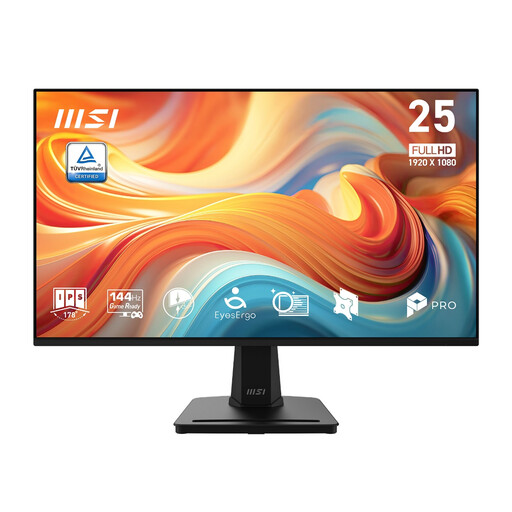
Why It Stands Out: While not a 240Hz panel, the MSI PRO MP251 E14L offers a fantastic entry point into high-refresh-rate gaming and productivity. Its 144Hz refresh rate is a major step up from standard 60Hz displays, providing a noticeably smoother experience in both games and everyday use. The IPS panel ensures vibrant colours and great viewing angles, and with a 1ms MPRT response time and Adaptive-Sync, it delivers a solid, tear-free gaming experience.
Pros:
- Smooth 144Hz refresh rate offers excellent value.
- Vibrant IPS panel with 99% sRGB colour coverage.
- Adaptive-Sync technology prevents screen tearing.
- Slim bezel design is great for multi-monitor setups.
Who is it for? This monitor is perfect for the user who wants a versatile display for work, study and casual-to-mid-level competitive gaming. It provides many of the benefits of a high-refresh-rate monitor at a more accessible price point.
Looking for More Options?
While 240Hz monitors offer a top-tier competitive experience, the world of gaming displays is vast. If you're looking for different sizes, resolutions or features, there are many excellent choices available.
️ Explore our full range of [1080p Monitor] options to find the perfect fit for your setup and budget.
Frequently Asked Questions
Is a 240Hz monitor worth it for gaming?
For fast-paced competitive games like first-person shooters (FPS), racing sims or battle royales, a 240Hz monitor can provide a noticeable advantage. The increased smoothness and reduced input lag allow for faster reaction times and more precise tracking of moving targets. For slower-paced, story-driven games, the benefit is less pronounced, but the overall fluidity is still a significant quality-of-life improvement.
Can my PS5 or Xbox Series X use a 240Hz monitor?
While the PlayStation 5 and Xbox Series X cannot output at 240Hz, they can output at 120Hz. A high-quality 240Hz monitor, especially one with HDMI 2.1 ports like the ASUS TUF VG279QM5A, is an excellent choice as it can easily handle the 120Hz signal from these consoles. This makes it a future-proof option that serves both your console and a potential high-end PC build.
What kind of graphics card (GPU) do I need for a 240Hz monitor?
To take full advantage of a 240Hz monitor, you need a graphics card capable of consistently producing 240 frames per second (FPS) in the games you play. For popular esports titles at 1080p, a mid-to-high-range GPU from recent generations (e.g., NVIDIA GeForce RTX 3060/4060 or AMD Radeon RX 6700 XT/7700 XT and above) is generally recommended. Performance will vary based on the game and your in-game settings.