
Android Tablets with SIM Card Slots: A UK Buyer’s Guide
Navigating the market for an Android tablet with SIM card slot can feel overwhelming. You need a device that keeps you connected on the go, whether for work, study or entertainment, without being tethered to Wi-Fi. However, the market is filled with confusing specifications and marketing claims that can lead to a disappointing purchase.
As the Joybuy Product Recommendation Officer, my role is to help you see past the hype. Let's look at the common pitfalls UK buyers face and how to choose a tablet that genuinely meets your needs and budget.
The 3 Traps to Avoid When Buying a 4G Tablet
- The "Massive RAM" Illusion: You will see tablets advertised with "20GB RAM" or even more. This is often misleading. Many models combine a smaller amount of physical RAM (e.g., 8GB) with "virtual RAM," which uses a portion of the slower internal storage. While it can help with multitasking, it is not a substitute for true, physical RAM and does not deliver the same level of performance.
- The Connectivity Blind Spot: A tablet might have a
4G LTE tabletlabel, but that doesn't guarantee good service across the UK. Some devices lack support for crucial frequency bands, particularly Band 20 (800MHz), which is used by networks like O2, Vodafone and others for widespread rural and indoor coverage. A tablet without this can leave you with patchy or non-existent signal outside of major cities. - The "Barebones Bargain" That Costs More: An attractively low price can be tempting, but it's important to consider the total cost of ownership. If a tablet doesn't include a protective case, screen protector or a keyboard for productivity, you may end up spending significantly more on essential accessories. A slightly more expensive bundle can often provide better value.
Core Features That Truly Matter
To make an informed choice, focus on these three non-negotiable areas.
1. Processor and Actual RAM
Performance comes from a balanced combination of the processor (CPU) and the physical RAM. An octa-core processor, such as a MediaTek Helio G99, provides a strong foundation for a high performance budget tablet. When paired with 6GB or 8GB of actual, physical RAM, the device can handle demanding applications, smooth multitasking and even serve as a capable budget gaming tablet. Don't let virtual RAM figures be the deciding factor; prioritise physical RAM for a responsive experience.
2. Display Quality and Certification
A large screen Android tablet is excellent for media and productivity, but size isn't everything. Look for these key display specifications:
- Resolution: A minimum of Full HD (1920x1200 pixels) ensures sharp text and clear images. For a
12 inch tablet Androidor larger, a higher resolution (like 2K) is even better. - Refresh Rate: A 90Hz or 120Hz refresh rate provides noticeably smoother scrolling and animations compared to the standard 60Hz, enhancing the overall user experience.
- Widevine L1 Certification: This is critical. Without Widevine L1, your tablet cannot stream content from services like Netflix, Prime Video or Disney+ in high definition. You will be stuck with blurry, standard-definition video, regardless of your screen's resolution.
3. True Mobile Connectivity
An Android tablet with SIM card slot is all about freedom. To ensure that freedom isn't compromised, verify the following:
- UK 4G Band Support: Check that the tablet explicitly supports the main UK 4G bands, including Bands 1, 3, 7 and the essential Band 20.
- Dual SIM Capability: A
dual SIM tabletoffers great flexibility. You can use two different networks to maximise coverage, or have separate SIMs for personal and work use or one for calls and another for a data-only plan. - Modern Wi-Fi: For fast and stable connections at home or in the office, ensure the tablet supports at least Wi-Fi 5 (802.11ac).
Top Product Recommendations
Instead of a generic list, we've matched specific models to different user needs, helping you find a tablet that fits your lifestyle.
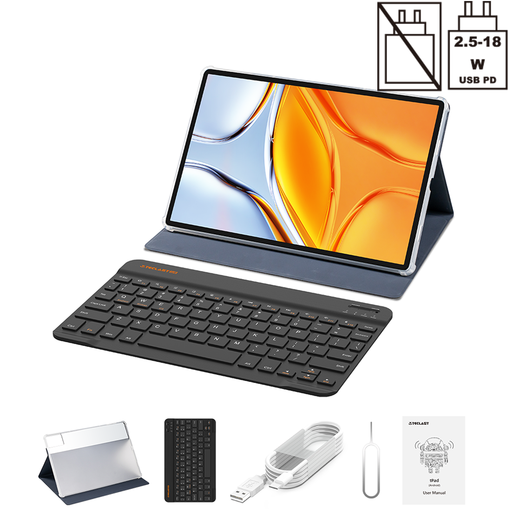
TECLAST T70 Tablet 14" 2.2K, Includes Folio Case+Keyboard
Why This Fits Their Persona: This is a true laptop alternative for a `tablet for students` or professionals. The expansive 14-inch screen provides ample space for writing essays, analysing spreadsheets or joining video calls. The included keyboard and case mean it's ready for productivity straight out of the box, while the 10,000mAh battery is built to last through a full day of lectures or meetings.
It directly counters the "barebones bargain" trap by providing a complete productivity bundle. You don't need to spend extra on a compatible `tablet with keyboard UK` or a case.
The combination of a huge 14-inch 2.2K display and an included keyboard offers outstanding value for productivity-focused users. It also features a powerful Helio G100 processor and 8GB of physical RAM.
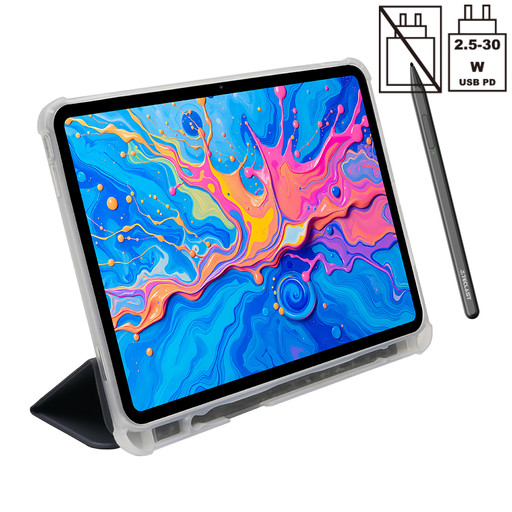
TECLAST ArtPad Pro Tablet — 12.7-Inch 2K Display
Why This Fits Their Persona: This is a purpose-built `drawing tablet with screen`. The sharp 2K display provides an excellent canvas, while the support for 4096 levels of pressure sensitivity with the included stylus allows for nuanced and detailed creative work. It's an ideal choice for anyone getting started with digital art, illustration or photo editing on a budget.
It avoids being a generic tablet by offering specialised hardware for a specific use case. The included stylus and protective case also prevent the hidden costs associated with "barebones" deals.
The high-pressure sensitivity stylus (T-Pen) and 2K resolution screen offer features typically found in more expensive creative devices. It also includes a powerful Helio G99 processor and Widevine L1 for HD streaming.
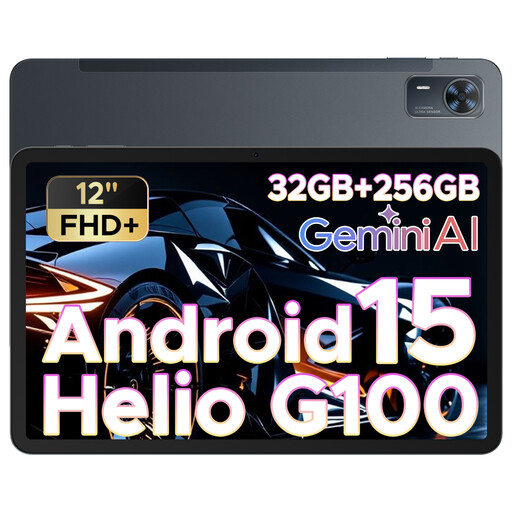
DOOGEE Tab E3+ Android 15 Tablet, 12 Inch FHD+
Why This Fits Their Persona: This is a fantastic all-rounder for family use. The large 12-inch screen is great for watching films together on a long journey, and the substantial 8800mAh battery ensures it won't run out of power halfway through. The `4G LTE` capability means it stays connected for streaming and browsing, even without Wi-Fi.
It sidesteps the "RAM illusion" by focusing on tangible performance. The capable Helio G100 processor and a 90Hz refresh rate deliver a genuinely smooth experience for games and media, which is more important than an inflated RAM number.
It offers a strong balance of a large 12-inch screen, long battery life and a smooth 90Hz display at an accessible price point, making it a versatile media and `budget gaming tablet`.
Looking for More Options?
We have compiled a complete, real-time list of products that fully satisfy these strict selection criteria and UK safety regulations.
Frequently Asked Questions
Can I use any UK network's SIM in a 4G tablet?
For the most part, yes, as long as the tablet is sold unlocked. The most important factor is to check the supported 4G frequency bands. For reliable UK-wide coverage, ensure the tablet supports bands 1, 3, 7 and especially Band 20 (800MHz). This band is crucial for good signal in rural areas and better indoor penetration on networks like O2, Vodafone, Three and giffgaff.
What is Widevine L1 and why does it matter?
Widevine is a digital rights management (DRM) technology that streaming services use to protect their content. Widevine L1 is the highest level of certification, which is required for a device to play video in high definition (HD, 1080p) or higher. Tablets with only Widevine L3 certification are permanently restricted to standard definition (around 480p), which will look pixelated and blurry on a modern tablet screen. Always check for L1 if you plan to watch Netflix, Disney+ or Prime Video.
How much actual RAM is enough for an Android tablet in 2026?
Do not be swayed by large virtual RAM figures. For smooth everyday use—including web browsing, streaming and social media—4GB of physical RAM should be considered the absolute minimum. For a better, more future-proof experience that supports fluid multitasking, light productivity or gaming, a tablet with 6GB to 8GB of physical RAM is the recommended choice.