
Our Top Recommendations for the Right Android Drawing Tablet in 2026
As a digital artist, illustrator or creative student, you know that the right tool can make all the difference. Finding an Android drawing tablet that delivers a fluid, responsive experience without a hefty price tag can be a challenge. You need a device that can keep up with your imagination—one with a sensitive stylus, a vibrant display and enough power to run demanding creative applications without frustrating lag.
My role as the Joybuy Product Recommendation Officer is to help you navigate the options. This guide cuts through the marketing jargon to offer practical advice and highlight devices with the features that matter most for digital art, helping you find a tablet that truly supports your creative workflow.
Key Considerations for Choosing a Digital Art Tablet
Before we look at specific models, let's analyse the core features that separate a standard tablet from a powerful creative tool.
1. Display Quality and Stylus Performance
The connection between your screen and stylus is paramount. For a graphics tablet for artists, look for a high-resolution display, such as a 2K display tablet, which ensures your lines are crisp and your colours are accurate. Equally important is the stylus. A tablet with stylus pen that supports high levels of pressure sensitivity—such as 4096 pressure sensitivity—allows you to vary line weight and opacity with natural hand movements, mimicking the feel of traditional drawing tools.
2. Processing Power and Memory
Creative software requires significant resources. An octa-core processor paired with a generous amount of RAM is essential for smooth performance when working with large files, complex layers or intricate brushes. Insufficient power can lead to input lag, where the line on the screen can't keep up with your pen, disrupting your creative flow. Look for models with at least 8GB of RAM and a capable processor to ensure a seamless experience.
3. Screen Size and Portability
The ideal screen size depends on your personal workflow. A larger screen, like a 12 inch tablet with pen or even a 14-inch model, provides a more expansive canvas, which can feel more immersive and reduce the need for constant zooming and panning. However, a smaller, more compact tablet might be preferable if you frequently work on the go. Consider where you do most of your creative work to find the right balance between canvas size and portability.
Our Top Recommendations for 2026
Here are a few standout Android tablets that offer compelling features for digital creators, selected for their balance of performance, features and value.
DOOGEE U11 11-Inch Android 15 Tablet
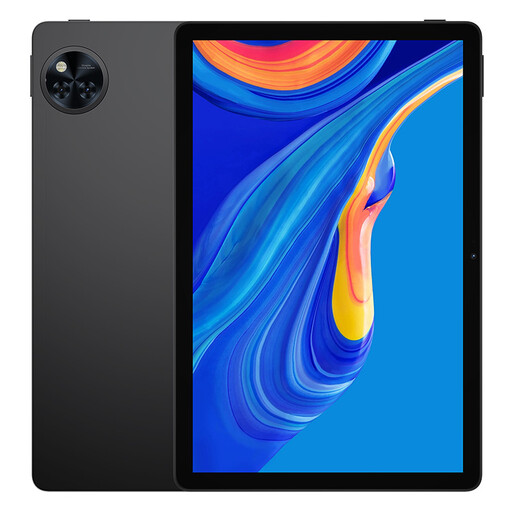
Why It Stands Out: The DOOGEE U11 is a versatile tablet that combines modern software with a smooth user experience. Its 11-inch IPS display features a 90Hz refresh rate, which contributes to smoother scrolling and a more responsive feel during general use. Running on the latest Android 15 system, it offers up-to-date features and security.
-
Pros:
- Smooth 90Hz display enhances visual fluidity.
- Large 8580mAh battery supports extended creative sessions.
- Storage is expandable up to 2TB, providing ample space for large project files and asset libraries.
- A solid all-rounder for media consumption and productivity in addition to creative tasks.
-
Who is it for? This tablet is a strong candidate for students, hobbyists and aspiring artists looking for a capable and affordable entry into the world of digital art. Its balanced features make it suitable for sketching, note-taking and everyday use.
TECLAST ArtPad Pro Tablet
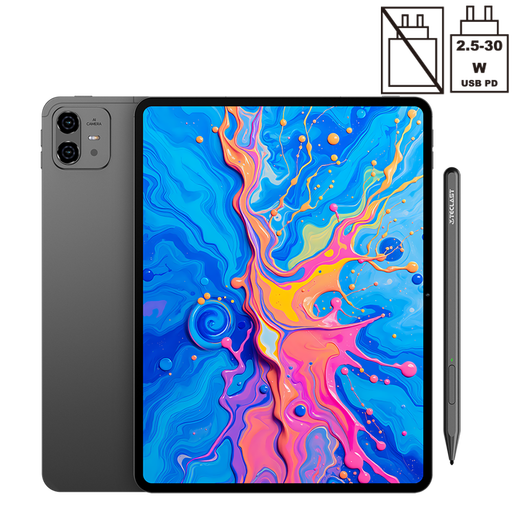
Why It Stands Out: The Teclast ArtPad Pro is purpose-built for artists. Its main draw is the combination of a large 12.7-inch 2K display and an included T-Pen stylus that supports 4096 levels of pressure sensitivity. This pairing provides the precision and control needed for detailed illustration and design work, making it a formidable digital art tablet.
-
Pros:
- High-resolution 2K display offers exceptional clarity and detail.
- 4096 pressure sensitivity with the included stylus allows for nuanced artistic expression.
- The powerful Helio G99 octa-core processor and 20GB of RAM (including virtual expansion) handle demanding creative apps with ease.
- A massive 10,000mAh battery ensures it can last through long drawing sessions.
-
Who is it for? This tablet is aimed squarely at serious digital artists, illustrators and graphic designers who need a high-performance device dedicated to their craft. If precision, a large canvas and lag-free performance are your top priorities, the ArtPad Pro is an excellent choice.
View Details for TECLAST ArtPad Pro
TECLAST T70 Tablet with 14-Inch Display
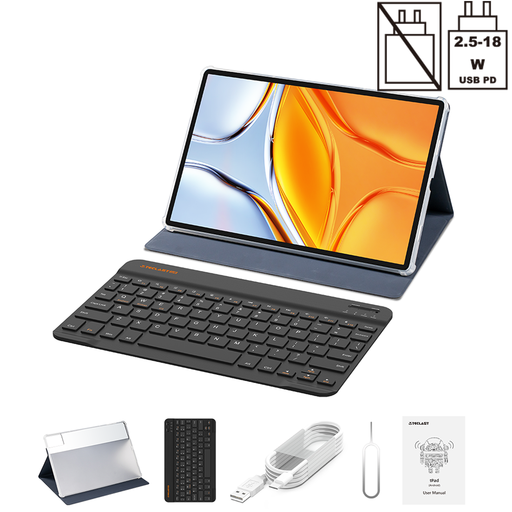
Why It Stands Out: For those who believe bigger is better, the TECLAST T70 offers an expansive 14-inch display. This huge canvas provides an unparalleled drawing area, minimising the need to zoom and pan. It shares the same powerful Helio G99 processor and 20GB RAM configuration as the ArtPad Pro, ensuring it has the performance to back up its size.
-
Pros:
- The very large 14-inch screen creates an immersive workspace for drawing and multitasking.
- Includes a protective case and a Bluetooth keyboard, adding significant value and turning it into a versatile 2-in-1 device.
- Strong performance with the Helio G99 processor and ample RAM.
- The 10,000mAh battery with 18W fast charging keeps you powered up.
-
Who is it for? This tablet is ideal for artists and designers who want the largest possible digital canvas for their work or for creatives who need a device that can seamlessly switch between drawing, writing and other productivity tasks. Its size and included accessories make it a great studio or home-office centrepiece.
Looking for Other Options?
The models highlighted here represent a strong balance of features for digital artists. However, the market is full of excellent devices with different specifications and price points. If you're interested in exploring a wider selection, you can browse more options in our broader category.
Explore More Android Tablets on Joybuy
Frequently Asked Questions
Can you use a regular Android tablet for drawing?
Yes, you can use a regular Android tablet for drawing, but the experience may be limited. For the best results, you should choose a model that specifically supports an active stylus with pressure sensitivity. This feature is what allows you to create varied line weights and achieve a more natural drawing feel, which is often missing on standard tablets.
What is a good level of pressure sensitivity for a drawing tablet?
A good starting point for serious digital art is a tablet that offers at least 2,048 levels of pressure sensitivity. However, a device with 4096 pressure sensitivity, like the Teclast ArtPad Pro, provides even greater control and nuance. This allows for very subtle variations in pressure, which is ideal for detailed line work, shading and professional-quality illustration.
Is a 2K display necessary for a digital art tablet?
While not strictly necessary, a 2K display tablet offers significant advantages for artists. The higher resolution (such as 1920x1200 or more) results in sharper lines, clearer details and more accurate colour representation. This makes it easier to work on intricate designs and ensures that what you see on the screen is a true reflection of your final artwork.