
Finding the Right 32-Inch Curved Gaming Monitor: Top Recommendations
Finding a monitor that pulls you into your games without costing a fortune, while also being practical for your daily work, can feel like a difficult task. The market is filled with technical jargon, and it's easy to get lost. If you're looking for a large, immersive screen that offers smooth performance for both entertainment and productivity, a 32 inch curved gaming monitor is an excellent place to start.
This guide is designed to help you understand the key features that matter for a versatile setup. We'll break down what to look for and share some of our top recommendations to help you find a display that fits your needs and budget.
What to Look for in a Versatile Monitor
Choosing the right monitor involves balancing several key specifications. For a display that serves as a great monitor for work and gaming, here are a few important factors to consider.
Balancing Screen Size and Resolution: The Full HD Sweet Spot
A 32-inch screen offers a vast, cinematic viewing area that makes games and movies feel incredibly immersive. While higher resolutions like 1440p or 4K are available, a Full HD 32 inch monitor (1920x1080) presents a compelling option for budget-conscious users. The lower pixel density is a trade-off for a much more accessible price point. More importantly, Full HD resolution is less demanding on your graphics card, allowing you to achieve higher frame rates in games for smoother performance, which is often more noticeable than a slight increase in sharpness.
Why a 100Hz Refresh Rate Matters
The refresh rate, measured in Hertz (Hz), determines how many times per second the image on the screen is updated. Standard monitors operate at 60Hz, but a 100Hz curved monitor provides a significant upgrade. This higher refresh rate results in noticeably smoother motion, not just in fast-paced games but also when scrolling through web pages or moving windows around your desktop. It creates a more fluid and responsive user experience overall. When paired with technology like an AMD FreeSync monitor, it also helps to eliminate screen tearing and stuttering by synchronising the monitor's refresh rate with your graphics card's output.
The Immersive Advantage of a Curved Screen
A curved screen is designed to mimic the natural curvature of the human eye, creating a more panoramic and immersive field of view. For gaming, this can make you feel more involved in the action. For work, the gentle curve can help reduce eye strain and improve focus by keeping the entire screen at a more consistent distance from your eyes, especially on a large 32-inch display.
Top Monitor Recommendations
Here are a few monitors that stand out for their balance of features, performance and value.
LG Electronics 32MR50C-B 32 inch Widescreen Full HD Curved Monitor
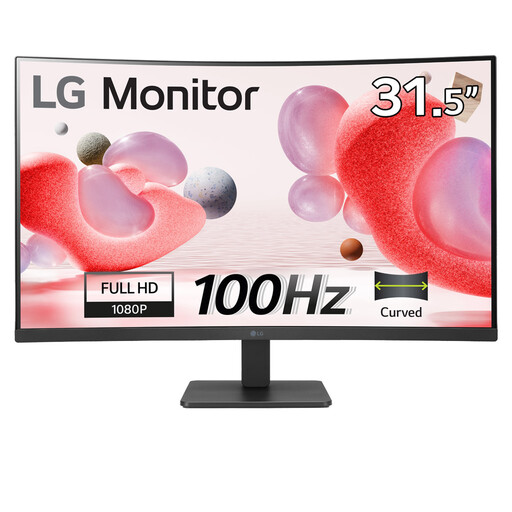
Why It Stands Out: This LG curved gaming monitor is a fantastic all-rounder that hits all the right notes for a versatile home setup. It combines a large, immersive 32-inch curved screen with a smooth 100Hz refresh rate and AMD FreeSync technology, making it a great choice for casual gaming. It also includes practical features for long work sessions.
Pros:
- Large 32-inch Full HD curved display for an immersive experience.
- 100Hz refresh rate provides fluid motion in games and daily use.
- AMD FreeSync support reduces screen tearing for smoother gameplay.
- Includes Reader Mode and Flicker Safe technology to help reduce eye strain.
Who is it for?: This is an ideal choice for anyone seeking a large, affordable and versatile display. It's perfect for casual PC and console gamers, as well as home office users who want a single monitor that can handle both work and entertainment without compromise. It's a strong contender for an affordable 32 inch monitor.
LG UltraWide Monitor 29U511A - UWFHD 1080p IPS 29 inch
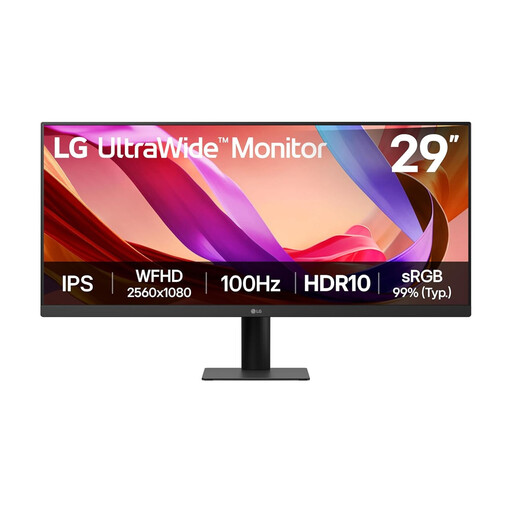
Why It Stands Out: If productivity is your main priority, this 29-inch ultrawide monitor offers a different kind of immersion. The 21:9 aspect ratio provides significantly more horizontal screen space, allowing you to view multiple documents or applications side-by-side without needing a second monitor.
Pros:
- 21:9 UltraWide screen is excellent for multitasking and productivity.
- IPS panel delivers accurate colours, supported by HDR10.
- Smooth 100Hz refresh rate for fluid visuals.
- Eye-care features like Reader Mode and Flicker Safe are included.
Who is it for?: This monitor is aimed at home office professionals, content creators and students who need to manage multiple windows efficiently. While it's not curved, its ultrawide format offers a compelling alternative for those who value workspace over sheer screen size.
ASUS ZENSCREEN MB166CR FHD
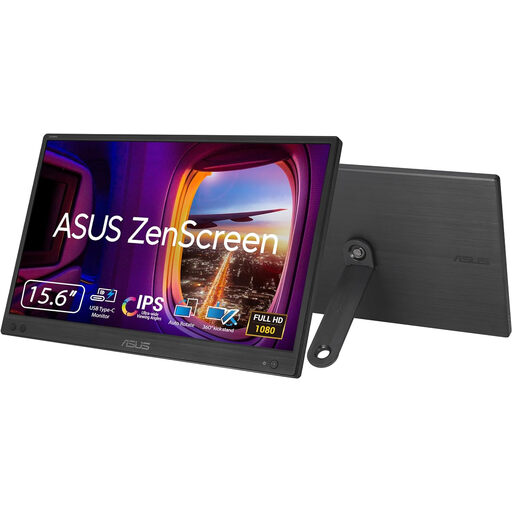
Why It Stands Out: For those who value flexibility and work on the move, a portable monitor is a game-changer. The ASUS ZenScreen is incredibly slim and lightweight, connecting to your laptop with a single USB-C cable for both power and video, making it effortless to set up a dual-screen workspace anywhere.
Pros:
- Extremely portable at just 780g and 11.8mm thin.
- Simple single-cable USB-C connection for power and display.
- Crisp 15.6-inch Full HD IPS panel with wide viewing angles.
- Ideal for extending your laptop screen while travelling or in a hybrid work setup.
Who is it for?: This is for the mobile professional, frequent traveller, or student who needs to expand their screen real estate without being tied to a desk. It’s a productivity tool first and foremost.
Looking for Something Different?
While these recommendations cover some of the most popular needs, your perfect monitor might have different specifications. If you're looking for other sizes, resolutions or features, there are many more options to discover.
Explore our full range of HDMI display screens to find the perfect fit for your setup.
Frequently Asked Questions
Is a 32 inch curved monitor good for gaming?
Yes, for many gamers, a 32-inch curved monitor offers a highly immersive experience that can make single-player and cinematic games feel more engaging. The large size and gentle curve fill your peripheral vision, drawing you into the game world. For highly competitive esports players, a smaller, flat screen might be preferred for seeing the entire screen at a glance, but for most casual and enthusiast gamers, the immersion is a major benefit.
Is Full HD (1080p) resolution suitable for a 32 inch monitor?
This is a common point of discussion. At a typical desk viewing distance, you may be able to discern individual pixels on a 32-inch 1080p screen. However, it remains a popular choice because it offers a large, immersive screen at a very affordable price. Furthermore, running games at 1080p is much less demanding on your computer's hardware, allowing for higher and more stable frame rates, which contributes to a smoother gaming experience.
What is the real benefit of a 100Hz curved monitor?
A 100Hz refresh rate provides a tangible improvement in visual smoothness over the standard 60Hz. In games, this means less motion blur and a more responsive feel. In everyday use, actions like scrolling through websites, dragging windows and even moving your mouse cursor appear noticeably more fluid. It’s a quality-of-life feature that, once experienced, is hard to go back from.
By Joybuy Product Recommendation Officer